

Know how much to save, and where every dollar should go
How much do we need to save? If you are still working, it is the big question. The honest answer depends on your accounts, your spending, when you stop work and how long the money has to last.
Ready Aim Retire works it out from your own plan. It finds the smallest amount that gets your plan to the finish line, models a paycheck that winds down the way careers really do, and shows exactly which account each dollar lands in.
Start Planning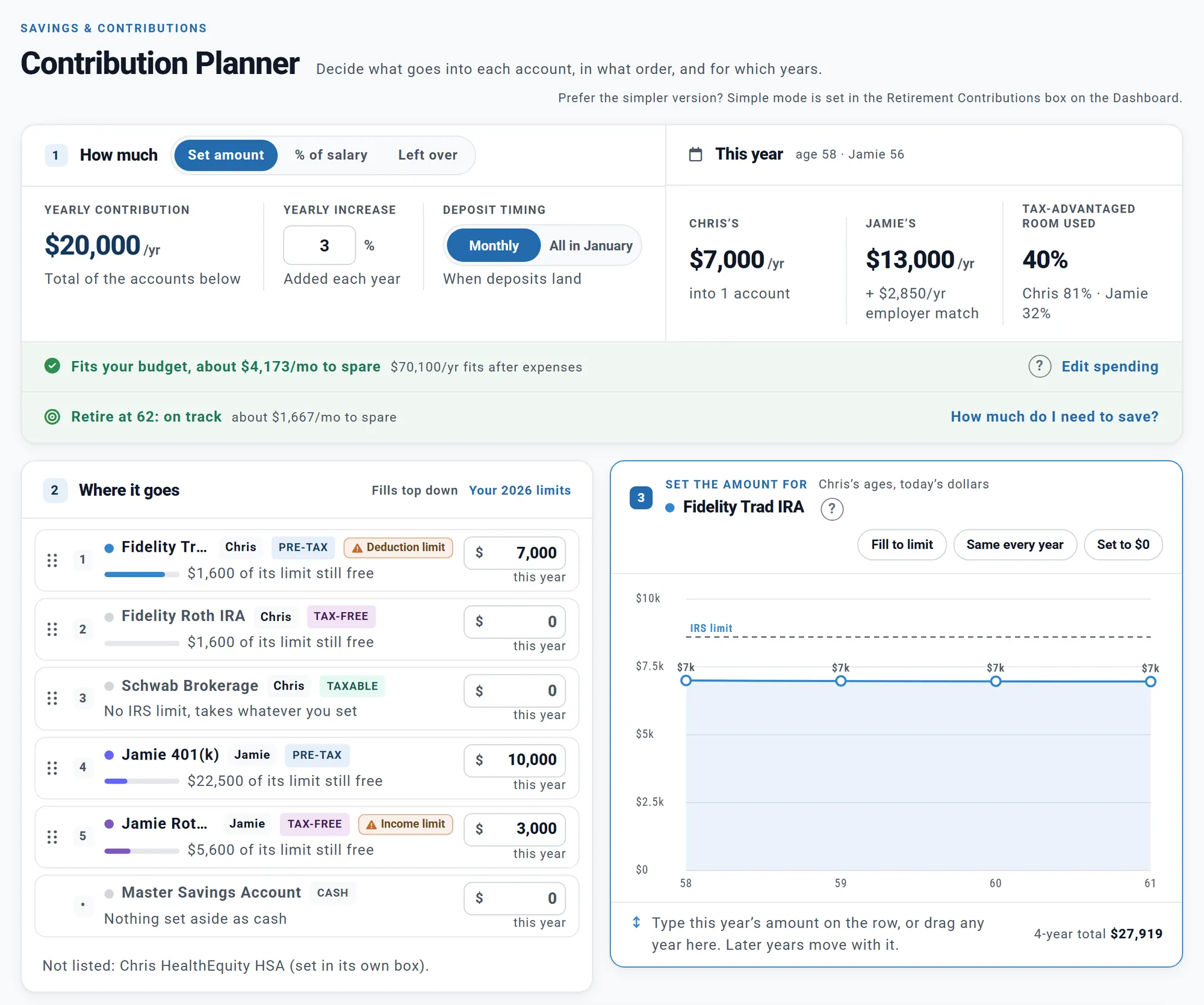
Chris and Jamie's Contribution Planner: $20,000 a year, ranked account by account. Chris and Jamie are a made-up couple we use in our examples.
Tell it when you want to retire and how much you want left at the end. It runs your plan about a dozen times, adding to your saving the way you save now, until the money lasts to the end of your plan. The answer is rounded up to the next $25 a month that works.
It works on every account, and it shows you:
Like the answer? Use it, and the new amount goes into your plan account by account. It never changes your retirement age. Then see how it holds up through real market history on your Chance of Success.
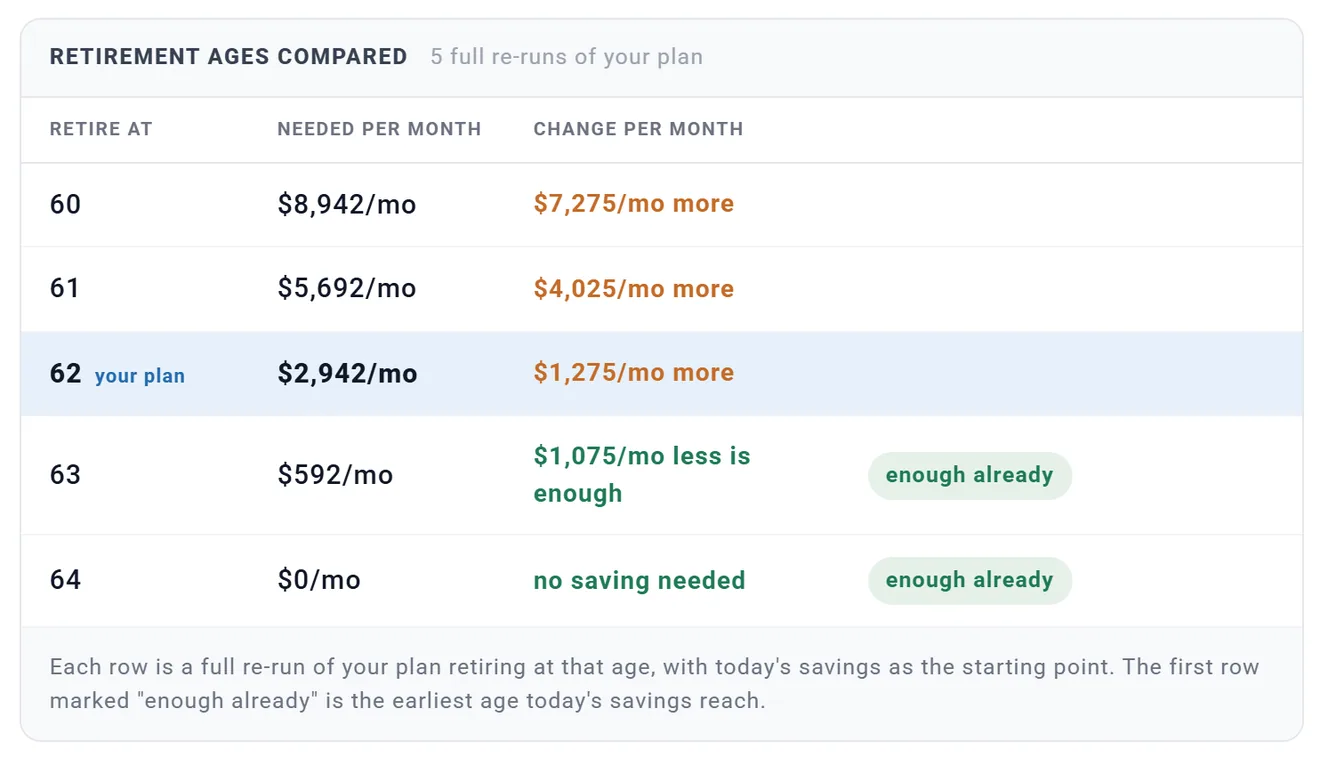
Chris and Jamie's retirement ages compared, with their spending raised to $12,000 a month to show a plan that falls short.
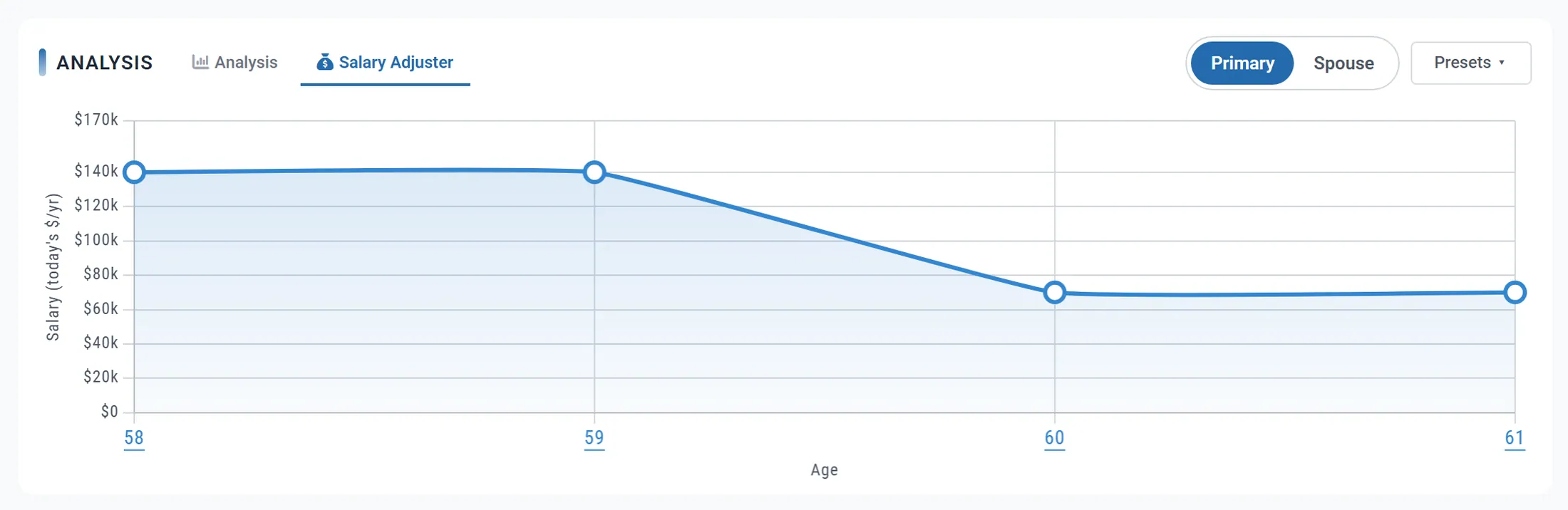
Chris's salary, drawn year by year: full pay through 59, then about half until retiring at 62. Chris is part of our made-up couple.
Few people work full time right up to a Friday and then stop. They step down to part time, take a year off, or get raises along the way. Employment Income handles all of that.
Switch your salary to Adjust and draw it year by year on a chart, in today's dollars. Your taxes, your saving and your employer's money all follow the curve.
Keeping your retirement age where it is matters. Model the part-time years as retirement instead, and your withdrawals would start early, your saving would stop early, and that pay would carry no Social Security or Medicare tax.
Each of you gets your own Employment Income box, with the facts about the job: the salary, when it stops, what your employer adds and the Roth catch-up rule.
With your pay in the plan, saving pre-tax lowers your income tax, your employer's match is added on top, and a take-home check shows whether your spending and saving fit what you bring home.
One of you working longer? That pay covers the household's spending first. When Chris retires and Jamie works 33 more months, entering both salaries cuts what the plan takes from savings in those months from $286,817 to $65,508.
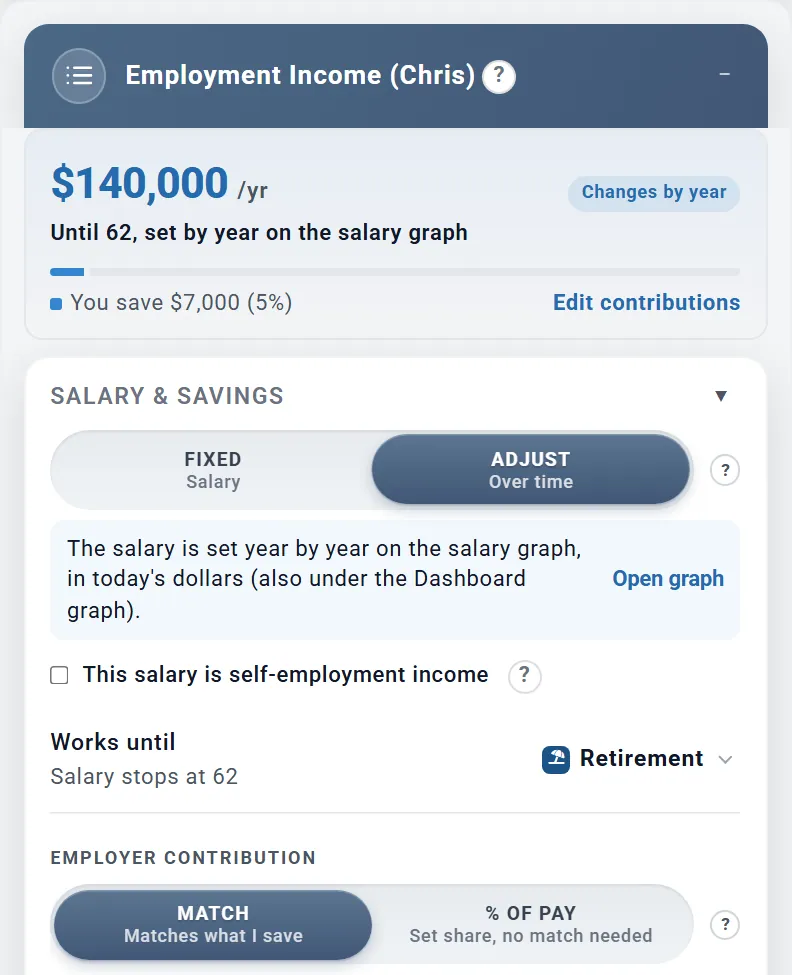
Chris's Employment Income box, from our made-up couple, Chris and Jamie.
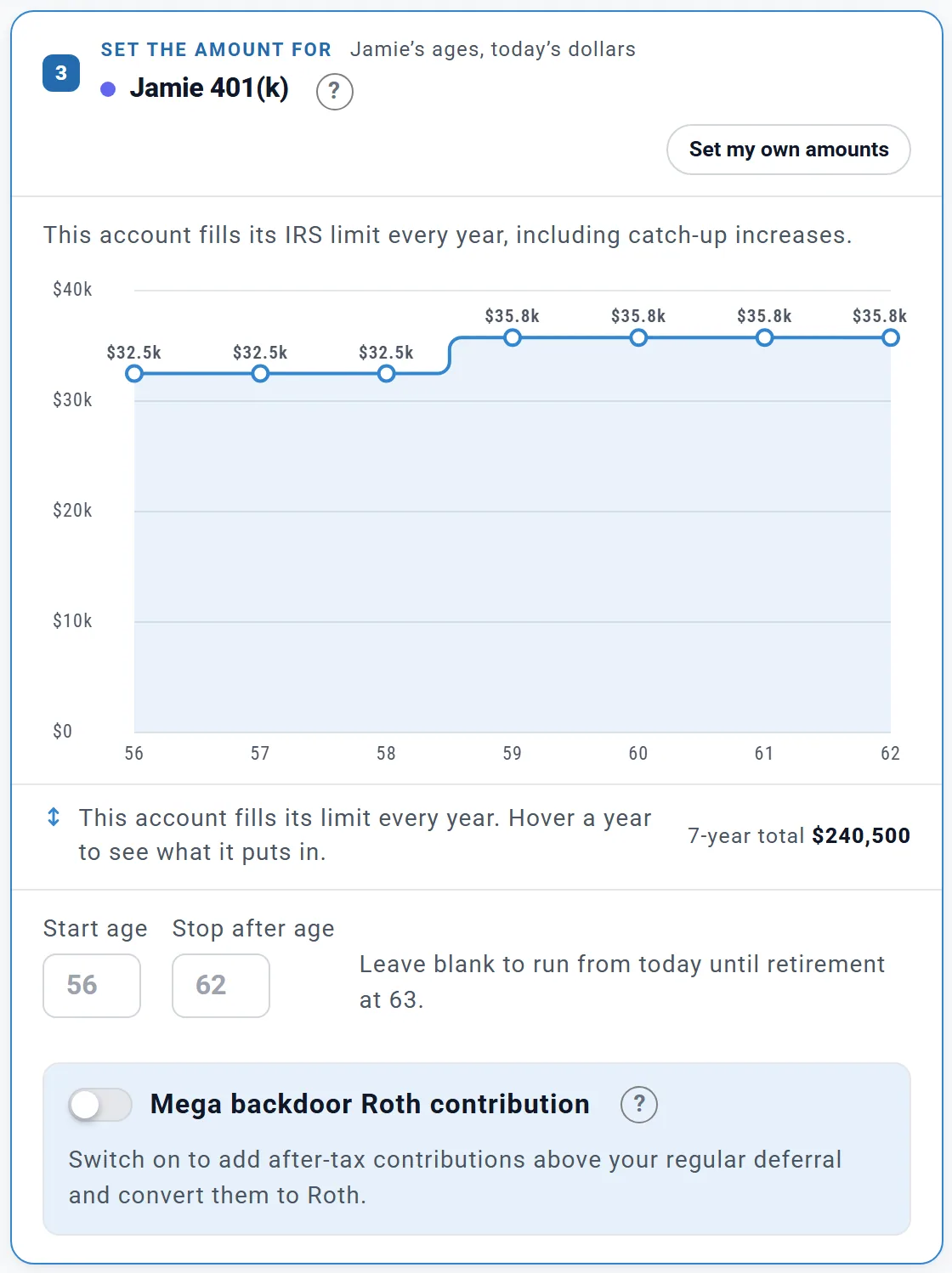
Jamie's 401(k) on Fill to limit: the catch-up steps up on its own. Jamie is part of our made-up couple.
Save $20,000 a year between you, and which accounts get it? In what order? What happens when one fills up? The Contribution Planner answers all three on one page.
There is no Apply button: each change is part of your plan at once, and the chart underneath shows each year's deposits, your employer's money, and what your saving grows to.
Typing each account's amount works on a Preview account. Fill to limit, the same every year, amounts by year and changing the order are part of Planner+.
There is nothing to enter for a catch-up. The planner adds it from each person's age. The 2026 US limits:
Later years rise with your plan's inflation assumption. Planning in Canada? The RRSP, TFSA and FHSA limits are built in too.
Some workplace plans let you add after-tax money above your regular limit and move it to Roth straight away. Switch it on for a 401(k) or 403(b), choose the Roth account it goes into, and set the amount year by year.
The planner works out your room: the $72,000 overall limit, less your regular deferral and your employer's money. It is not deducted, earns no match, and grows tax-free in the Roth account.
Your plan's own after-tax cap is not modeled, so check your plan documents.
A new plan starts in Simple, and most plans can stay there. Type one yearly amount and split it evenly, or set an amount for each account, then add a yearly increase.
Switch to Advanced when you want the limits applied, amounts that change by year, or your saving tied to your pay. Both keep their settings, so you can switch back any time.
The limits and payroll taxes follow your country's rules:
Chasing financial independence? Compare retirement ages reruns your plan two years either side of your retirement age and marks the ones today's saving already reaches. Save a share of your pay, or whatever is left after your working-year expenses, and fill your accounts to their limits every year.
Stopping before 65 means buying your own health insurance until Medicare. Add marketplace premiums and tax credits to your plan: see how health care is planned, and our page for the FIRE crowd.
"How much do I need to save?" and the Contribution Planner work from your plan's projection, in today's dollars, under your own assumptions. Real returns, tax law and your career will differ, and limits after 2026 are estimates until they are announced. A few things are left out, such as vesting, SEP IRA and solo 401(k) limits, and the income limits on Roth IRA contributions; the guide lists them all. Ready Aim Retire is an educational tool, not tax or investment advice.
Every account, home and loan, together in one living model.
Insurance before 65, Medicare after, and what each will cost.
Turn your lifestyle into a spending plan that lasts.
Your plan in plain English, and what is worth a look next.
Your plan replayed through real market history since 1871.
Every year of your plan, and the milestones that shape it.