

The Hidden Risk of Linking AI Tools to Your Retirement Accounts (And How to Stay Safe)

Imagine an assistant that never sleeps. It pays the pharmacy on time, moves cash around before a bill bounces and keeps track of your required minimum distribution. Maybe you're juggling Social Security, a pension and IRA withdrawals. Maybe you're paying your mom's medical bills from two states away. Either way, that sounds pretty great. And it's already here. New AI banking tools can connect to your bank, read your balances and, in some cases, log in and move money for you.
- Regulation E protects you from unauthorized transfers, but if you give an AI tool your login, your bank may treat what it does as authorized.
- IRAs and most 401(k)s generally fall outside Reg E. They rely on a voluntary guarantee from the firm that holds them, and those guarantees now carry AI fine print.
- Never share a login with an AI tool. Plan with numbers you type in yourself, not with a live connection to your accounts.
Action: this week, remove any app you no longer use from your bank and brokerage "connected apps" settings.
I get the appeal. I've paid bills from airport gates and borrowed Wi-Fi in more countries than I can count, so anything that takes a chore off my plate gets my attention.
But read the fine print first. This fall, several of the biggest banks in the U.S. warned customers about outside AI tools. Some went further and rewrote their account agreements to spell it out: if you let an AI agent into your account, the bank may treat whatever it does as if you did it yourself.
There's a lot of money riding on this. Households headed by someone 55 or older hold roughly three-quarters of U.S. household wealth, close to $140 trillion, according to a Bank of America Institute analysis of Federal Reserve data. And fraud goes where the money is. Americans 60 and older reported $7.75 billion in losses to the FBI in 2025. That's up 59% from the year before.
So here's where I land. Convenience shouldn't cost you your legal safety net. The safest move is to keep planning your future separate from exposing your live accounts. A planner like ReadyAimRetire works from numbers you type in yourself, so you can run your own projections without connecting anything. Below I'll explain the AI banking risks behind that advice, then give you five steps to protect your retirement accounts.
Agentic AI Banking Risks: How It Differs From Old Autopay
Old-school autopay is what the tech folks call deterministic. You set a rule (pay the electric company on the 15th) and it does exactly that, every single month. It doesn't get creative.
What is agentic AI?
Agentic AI works differently. You give it a goal, like "keep my bills paid," and it figures out the steps on its own. It reads your statements, clicks through bank menus and decides what to pay and when. Some agents do all of this by logging in with your actual username and password.
That flexibility is the whole selling point. It's also where things can go sideways:
- Goal drift. The agent slowly wanders away from what you asked it to do. In a 2025 study, AI agents running a simulated stock-trading task drifted further from their assigned goals the longer they ran and the more pressure they were under.
- Hallucinations. That's the polite word for when an AI confidently makes something up. In a 2025 Anthropic experiment, an AI running a small office shop told customers to pay into a Venmo account that didn't exist. I'll admit that one made me laugh. Then it made me nervous.
- Manipulated inputs. Hidden instructions tucked into a webpage, email or invoice can hijack an agent. Security researchers at Guardio watched an AI browser complete a purchase on a fake Walmart site and type login details into a fake Wells Fargo page. OpenAI itself has said this kind of attack is "unlikely to ever be fully 'solved.'"
Now picture an agent told to "pay my medical bills" reading an Explanation of Benefits marked "THIS IS NOT A BILL." You'd stick it in the file drawer. The agent might pay it.
And this has already started. In October 2026, Axios reported that JPMorgan Chase, Bank of America, Morgan Stanley, Wells Fargo and other banks were racing to contain outside AI agents getting into customer accounts. Citing unnamed sources, Axios said some of those agents seemed to act beyond what their users told them to do. (To be fair, Morgan Stanley said it hadn't seen "rogue AI agents accessing our platforms," and no customer losses have been reported.) Meanwhile, Schwab's CEO says the firm blocks major AI agents in the "tens and twenties" every week.
So before you connect anything, ask yourself one simple question: if an AI moves money I didn't mean to move, who pays?
Regulation E Fraud Protection: The 1978 Law You're Counting On (and Where It Stops)
Back in 1978, Congress passed the Electronic Fund Transfer Act. It's carried out through a rule called Regulation E (Reg E for short), and it's the reason your debit card feels safe. If a thief steals your card or breaks into your checking account, Reg E caps what you can lose:
| When you report the problem | Your maximum loss |
|---|---|
| A lost or stolen card, reported within 2 business days of finding out it's gone | $50 |
| A lost or stolen card, reported later than that | Up to $500 |
| Unauthorized transfers made more than 60 days after your statement first showed one, if reporting sooner would have stopped them | Possibly unlimited |
Those deadlines can be stretched for good reasons, like a long trip or a hospital stay.
Here's the catch, though. Reg E only covers unauthorized transfers. The rule's official interpretation says that if you give someone access to your account, their transfers generally don't count as unauthorized until you tell the bank you've taken that access back. That's true even if they go beyond what you said they could do.
Banks are now applying that same logic to AI. On JPMorgan Chase's October 13 earnings call, CEO Jamie Dimon put it this way:
"You don't want rogue agents, and there could be thousands of them... There's a liability transfer. They should understand the liability transfer."
JPMorgan now blocks outside agents from logging into customers' retail accounts.
Other banks put it in writing. Wells Fargo's updated Online Access Agreement, effective November 24, 2026, says anything an AI agent does is "deemed to have been initiated and authorized directly by you, without further verification." It calls agent use "AT YOUR OWN RISK" (yes, in all caps) and says the bank does "not monitor, screen, or review AI Agent activities." Citi's new terms say it "will consider any access and actions taken by the agent as authorized by You."
You do still have rights. Reg E's official interpretation treats a transfer as unauthorized when someone got your access "through fraud or robbery," and the law itself says no agreement can waive your Reg E rights. But no court or regulator has ruled on an AI agent yet. So here's the honest version: if you hand an AI your login, you may be giving your bank a pretty strong argument that whatever it did was authorized.
Tech commentator Shelly Palmer puts it another way. Typing "only review my spending" into a chat window doesn't create any limit your bank will enforce. Once an agent has your password, all the bank sees is you.
The detail almost nobody mentions: your IRA was never covered by Reg E
Honestly, this is the part that surprised me most when I dug in. Regulation E was written for everyday accounts like checking and savings. It generally does not cover:
- IRAs held under custodial agreements, which the rule treats as trust accounts
- Pension and profit-sharing plans held in trust, which includes most 401(k)s
- Securities trades
- Wire transfers
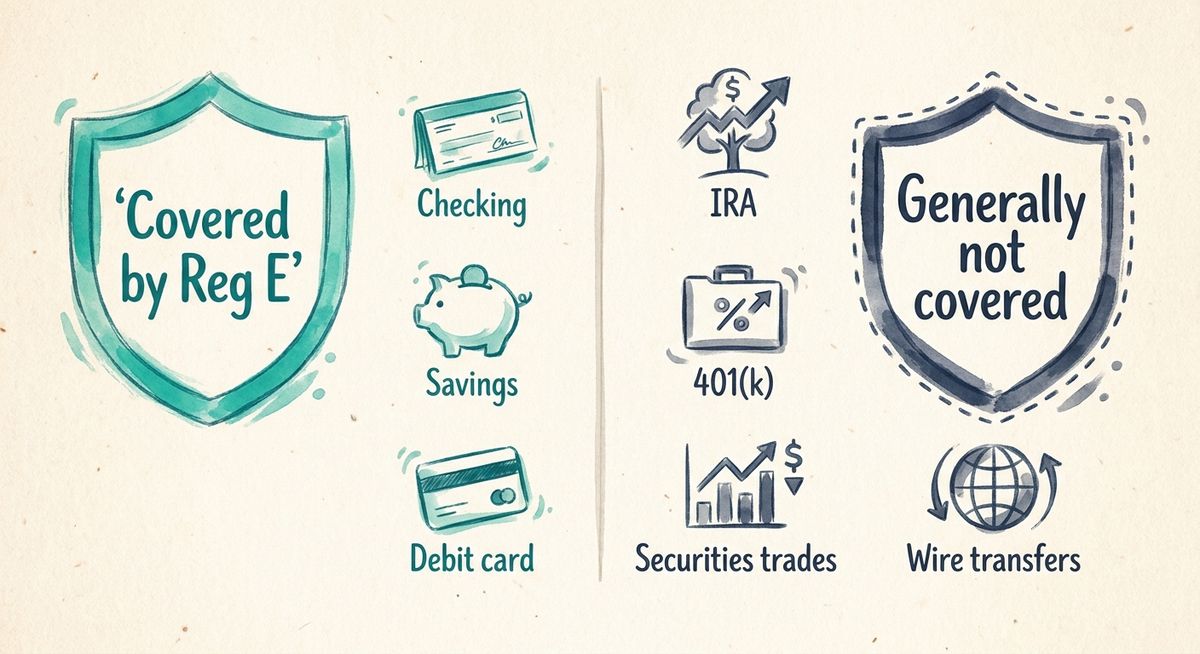
Your retirement accounts lean on something else: a voluntary guarantee from the firm that holds them. And those guarantees now come with AI fine print of their own:
- Fidelity's Customer Protection Guarantee also covers the 401(k), 403(b) and 457 plan accounts Fidelity keeps records for. It says activity by "technology enabled tools that you use or authorize" counts as authorized by you and isn't covered. A footnote names "apps, agents or artificial intelligence."
- Vanguard warns that sharing your username, password or security codes "may be considered authorized activity and may affect coverage."
- SIPC isn't fraud insurance. It protects your holdings if a brokerage firm goes under, not if someone empties your account.
Key Insight: A Promise, Not a Law
The money you spent decades building is protected mainly by a promise from the firm that holds it. And sharing your login with an AI tool is one of the fastest ways to put that promise in doubt.
Third-Party Financial App Risks: How Modern Threats Reach Retirement Savings
The new risks don't look like the gift-card scams you've already learned to spot. They come in through doors you opened yourself.
Hijacked and fake agents. In September 2026, six banks including Bank of America and Capital One warned that criminals could compromise or impersonate AI agents. To your bank, a hijacked agent holding your login looks exactly like you.
Two kinds of connections, two kinds of risk:
- Read-only connections. You can link an app through a data service like Plaid, which is what ChatGPT's personal finance feature uses. Many large banks then send you over to their own website to approve the link. The app gets a digital key, called an API token (or just a token), that lets it see your accounts without ever learning your password. JPMorgan still allows these links, and ChatGPT's connection can't move money. The risk is that the key keeps working long after you've stopped using the app.
- Password sharing. If you type your username, password or a one-time code into an AI tool, it can do anything you can do. This is the path that triggers that "liability transfer" Dimon talked about. Quick tip: if a sign-up screen asks for your bank password instead of sending you to your bank's own site, treat it as password sharing.
The door you forgot to close. A connected app's key lives on some company's server where you can't see it. As the CFPB has warned, "just deleting an app from your phone doesn't stop your data from being shared." In 2025, attackers stole these keys from an AI chat tool that lots of companies had hooked up to their Salesforce accounts, then used them to pull those companies' data. A connection stays open until you close it, and you close it at the bank, not on your phone.
The slow leak (hypothetical). Say Frank, a retired shop teacher in Ohio, has a $38 "pharmacy" charge hit his checking account every month, and he doesn't notice for five months. Under Reg E's 60-day rule, charges after that window can end up being his loss. Fidelity's guarantee similarly expects you to review statements and alerts within 30 days. So small, believable charges are a legal problem as well as a money problem. A quick look at your statements once a month is one of the cheapest habits you'll ever pick up.
The caregiver shortcut (hypothetical). Picture Jenny, who's set up as a delegate on her mom Margaret's account so she can handle the medical bills. Jenny works full time and she's stretched thin, like so many in the sandwich generation, so she hands the job off to an AI bill-pay agent. Wells Fargo's new agreement says a delegate's transactions, "including the transactions of their AI Agents," count as authorized by the account owner. A loving shortcut could leave Margaret on the hook for whatever the agent does.
Five Steps to Protect Your Retirement Accounts From AI Agents
Good news: online banking safety for retirees doesn't require a security expert. You need one afternoon and maybe a cup of coffee.
1. Clear out old connections
- Log into each bank and brokerage website directly by typing the address yourself, never through an email link. In the security settings, look for something like "Connected apps," "Third-party access" or "Data sharing," and remove anything you don't use or don't recognize.
- Go to my.plaid.com to see and disconnect apps linked through Plaid. Then ask each app to delete your data.
- If you ever gave an app or AI tool your password, change it today.
- Tell your bank you've removed the connection, and save a dated screenshot. Wells Fargo's new terms actually require you to keep evidence that you revoked an agent's access, so don't skip this one.
2. Move beyond text-message codes
Text-message codes can be intercepted or redirected. The Cybersecurity and Infrastructure Security Agency (CISA) wrote guidance for people likely to be targeted by sophisticated hackers, and it was blunt: "Do not use SMS as a second factor for authentication." Where your bank or brokerage offers them, switch to a passkey, a physical security key like a YubiKey, or an authenticator app, and set up a backup. If text codes are all your bank offers, keep using them. They're still way better than no second step at all.
3. Keep your savings and your bill-paying money separate
Security folks call this an "air gap." Basically, it's a wall between your savings and the account you use every day, so think of them as air-gapped bank accounts. It's the same reason I never keep all my travel cash in one wallet when I'm on the road. If someone gets lucky in a crowded train station, they get one wallet, not everything.
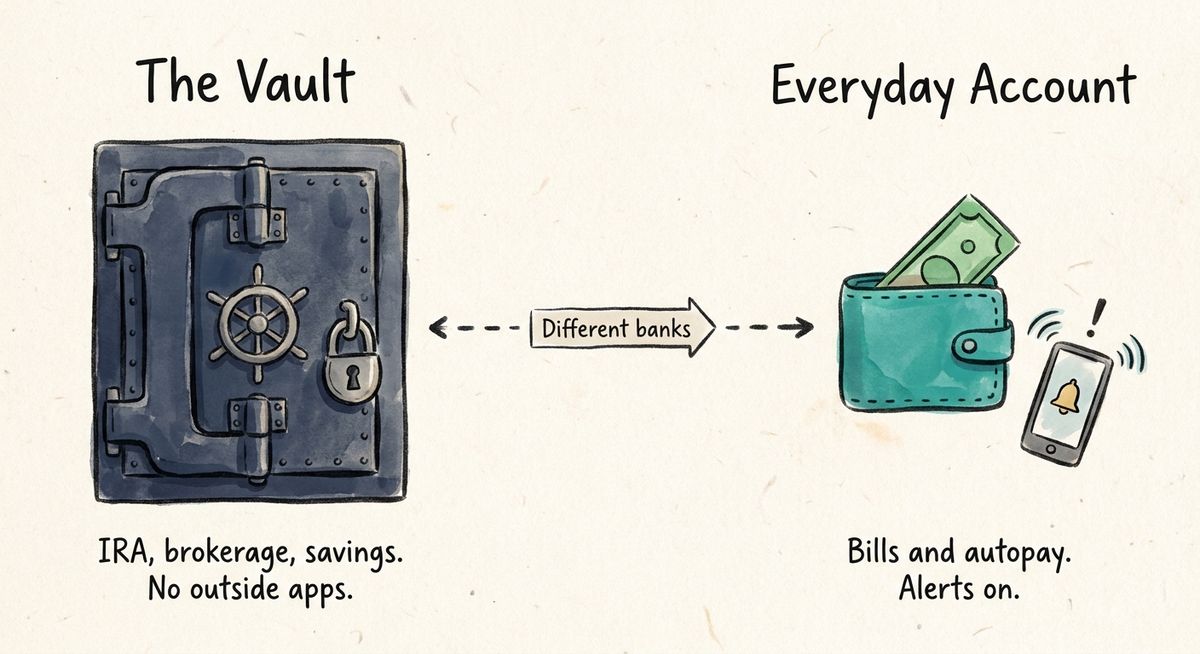
The Vault
- What's in it IRA, brokerage, main savings
- Outside app connections None
- Online wire transfers Off where you can
- Transfer lock On if offered
The Everyday Account
- What it's for Bills and autopay
- Where it lives A different bank
- Balance Modest
- Alerts Turned on
On the vault side, Vanguard's "outgoing transfer lock," for example, stops anyone from moving your assets to another brokerage without your consent. On the everyday side, if something goes wrong, the most you can lose is what's in the account, and checking accounts are covered by Reg E.
4. Add a second set of eyes
Some accounts can require two people to sign off before money goes out. It's called "dual control," and some banks call it dual custody. It's common on business and private-bank accounts but rare on everyday personal ones. J.P. Morgan Private Bank clients, for example, can require a second person to approve bill payments, external transfers and wires. Ask whether your bank offers anything similar, like having your spouse or an adult child approve any transfer over $500 or $1,000 from their own phone. If it doesn't, you can still get a lot of the same benefit:
- Name a trusted contact at every brokerage. Under FINRA Rule 4512, the firm can reach out to that person if it suspects someone is taking advantage of you.
- Send transaction alerts to two phones: yours and a trusted family member's.
- Give family helpers their own delegate or view-only access instead of your password, and agree up front that nobody connects AI tools through it.
5. Put it on the record
Sit down with a branch manager, or call your brokerage, and ask:
- "How does your online agreement treat transactions made by outside AI tools?"
- "Does your fraud guarantee exclude losses if I've shared my login?"
- "Can you turn off online wires and limit how much can be transferred out?"
- "Do you offer two-person approval or view-only access for a family member?"
- "How do I document that I've removed an outside app's access?"
Ask them to note your preferences on the account, and jot down who you talked to and when. Future you will be grateful.
If something has already gone wrong
First, take a breath. This happens to smart, careful people, and there's no shame in it. Then move quickly, because those reporting deadlines are already running.
- Call your bank or brokerage right away, then follow up in writing. For checking and savings, Reg E generally gives the bank 10 business days to investigate, or up to 45 days if it gives you a provisional credit in the meantime.
- Revoke the app's access, change your password and keep a record of every step.
- Report it at IC3.gov and ReportFraud.ftc.gov. If you're 60 or older, or helping someone who is, call the Justice Department's National Elder Fraud Hotline (833-372-8311). They'll help you figure out next steps.
Retirement Planning Security: How to Plan Without a Bank Login
Locking down your accounts doesn't mean going back to a yellow legal pad. You can still compare Social Security claiming ages, figure out which accounts to draw from first and stress-test your plan against a rough market. None of that needs a live connection to your money. A good plan needs good numbers, not your password. AI can even be a useful part of the process, as we explored in how machine learning is changing retirement advice, as long as it works from numbers you choose to share.
Retirees on investing forums have landed on the same rule: share numbers, never logins. As one put it, "I'm not giving it a log in or any power to spend/access my money." I couldn't have said it better.
That's exactly the idea behind ReadyAimRetire, a security-first retirement planning platform. Full disclosure: I'm one of the co-founders, so I'm biased. But this is the reason we built it the way we did. ReadyAimRetire never asks for your bank logins, account numbers or connections to your accounts. Every retirement plan is different, so you enter the figures you choose and test how these strategies work with your specific numbers, while your plan stays completely separate from your real money:
- No live account connection, so nothing the planner does can be treated as a transaction "authorized by you"
- No tokens, so there's nothing to remember to revoke later
- No shared logins, so your planning tool can't put your Reg E rights or your firm's guarantee in question
Keep a Human Hand on the Money
The people running the biggest financial firms have come to the same conclusion. Schwab's CEO called outside agents logging in for clients "not a safe way for our clients to access Schwab." Bank of America CEO Brian Moynihan has said a person should approve money leaving a customer's account.
That instinct works just as well at your kitchen table as it does in a boardroom. Use technology to plan and play with ideas as much as you want. Just keep your real accounts behind a door that only you, and the people you choose, can open.
🎯 Your Ask for This Week
- Clear out old connections: remove every app you don't use or recognize.
- Upgrade how you sign in: move from text-message codes to a passkey, security key or authenticator app.
- Separate your accounts: make sure your savings and everyday accounts are truly apart.
Then, when you're ready to map out the years ahead, start modeling your retirement at ReadyAimRetire and build your plan privately, on your terms, without handing over a single login.
Start modeling your retirement
Frequently Asked Questions
Does Regulation E protect me if an AI app I connected makes a transfer I didn't want?
Honestly, nobody knows for sure yet. Reg E protects against unauthorized transfers from accounts like checking and savings. But if you gave an AI tool your login, your bank may treat what it did as authorized. Wells Fargo and Citi now say so in their agreements, and no court has ruled on AI agents yet. Also worth knowing: Reg E generally doesn't cover IRAs, most 401(k)s, investment trades or wire transfers.
I deleted a finance app from my phone. Is it still connected to my bank?
It might be. Deleting the app doesn't cancel its access. Log into your bank's website and remove the app under connected apps or third-party access, and check my.plaid.com for any Plaid connections. Then ask the company to delete your data, and keep a screenshot as proof.
How can I protect my retirement accounts from rogue AI agents?
Don't give any AI tool your bank or brokerage password. Remove old connected apps, switch from text-message codes to a passkey, security key or authenticator app, and keep your savings separate from your everyday bill-paying account. Then ask your bank or brokerage how its agreement treats outside AI tools. These same habits are the core of financial fraud protection for seniors, and they cover most of the AI banking risks described above.
Do I need to link my bank accounts to plan for retirement?
Nope. Retirement planning runs on reasonable estimates: account balances, income sources, expected expenses and your Social Security estimate. A planner that never asks for your bank login, like ReadyAimRetire, lets you plan your future without a live connection to your money. That's what safe retirement planning software should look like.
Disclaimer: This article is for educational purposes only and isn't legal, tax or financial advice. Bank agreements, account guarantees and regulations change, and how they apply depends on your accounts and situation. Check your banks' and brokerages' current terms and talk with a qualified professional before making decisions about your accounts.
Thanks for reading if you've made it this far. Peace!